Wireframes
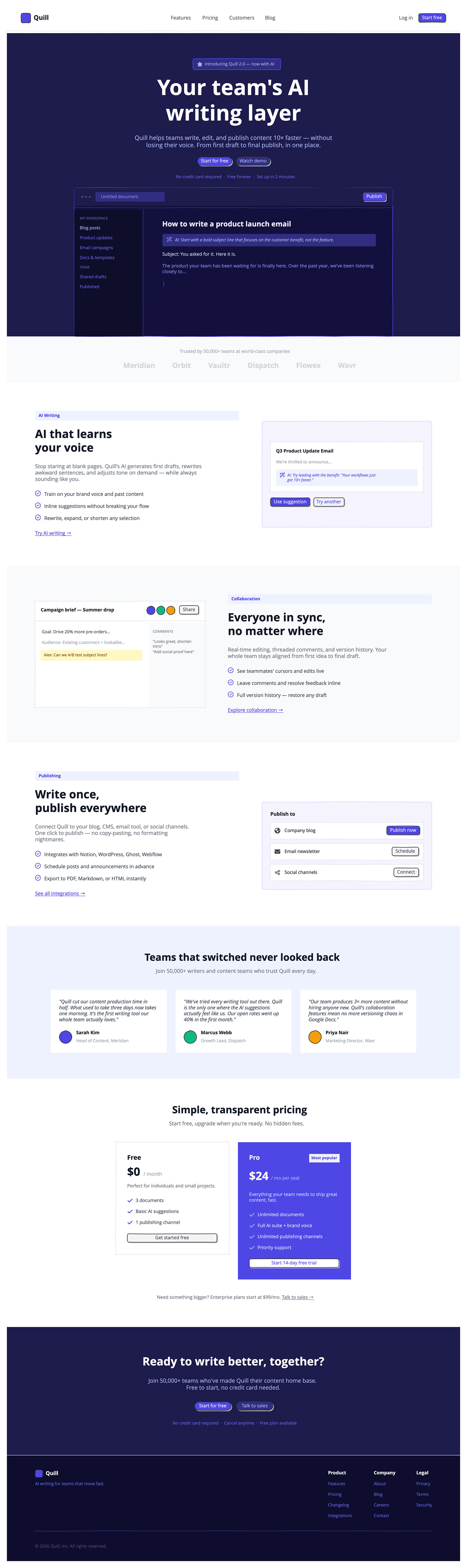
A single wireframe covers the full page: a hero section with a product mockup and primary CTA, a social proof bar with company logos, and three alternating feature sections covering the product's core capabilities.
The layout is built for a long-scroll experience and is easy to adapt to different products.
The fast way
Recreate this in Balsamiq AI
Paste this prompt into Balsamiq AI to generate a similar flow, then edit any line to make it yours.
Swap the brand name, change the colors, add or remove steps and fields.
Prompt for Balsamiq AI
Prompt generates AI designs. Results may vary.
Create a single long-scroll landing page board, 1280px wide, for a fictional AI writing tool called Quill. The accent color throughout is indigo (#4F46E5). The hero and final CTA sections share a deep navy background (#1E1B4B). Body sections alternate between white and a very light gray (#F9FAFB). The footer is near-black (#0F0D2E).

Navigation bar
A clean white nav, 64px tall, with a thin light gray border (#E5E7EB) along the bottom. On the left, a small indigo rounded-square shape sits next to the word "Quill" in bold dark gray (#111827), 18px. In the center, four nav links — Features, Pricing, Customers, Blog — in medium gray (#4B5563), 14px, spaced evenly. On the right, a "Log in" text link in medium gray next to a solid indigo button labeled "Start free" with white text.

Hero section
Full-width section with a deep navy background (#1E1B4B). Centered content, padded 72px top, no bottom padding (the hero mockup bleeds into the next section).
At the top, a small badge: a dark indigo pill (#312E81) with an indigo border (#4F46E5), containing a small star icon in periwinkle (#A5B4FC) and the text "Introducing Quill 2.0 — now with AI" in periwinkle, 12px.
Below that, a large two-line headline in white, 60px bold, centered: "Your team's AI / writing layer". Below it, a one-line subtext in periwinkle (#A5B4FC), 17px centered, 560px wide: "Quill helps teams write, edit, and publish content 10× faster — without losing their voice. From first draft to final publish, in one place."
Two pill-shaped buttons side by side: "Start for free" in solid indigo (#4F46E5) with white text, and "Watch demo" in dark indigo (#312E81) with periwinkle text. Below the buttons, a single line of fine print in medium indigo (#6366F1), 12px: "No credit card required · Free forever · Set up in 2 minutes".
Below that, a large product UI mockup card, 900px wide, with a very dark navy background (#13103D) and an indigo border (#4F46E5), rounded corners. Inside:
A top toolbar bar in dark navy (#1E1B4B) with three small dot glyphs on the left in muted indigo (#4C4980), a centered address-bar–style rectangle in dark indigo (#312E81) showing "Untitled document" in medium indigo (#818CF8), and a solid indigo "Publish" button on the right.
Below the toolbar, a horizontal divider in dark indigo (#312E81), then a two-column layout. The left column, 200px wide, is a very dark sidebar (#0F0D2A) with small section labels like "MY WORKSPACE" and "TEAM" in muted indigo caps, 10px, and nav items like "Blog posts" (active, periwinkle), "Product updates", "Email campaigns", "Docs & templates", "Shared drafts", "Published" all in medium indigo (#6366F1), 12px. A vertical divider in dark indigo separates the sidebar from the editor.
The editor area, on the right, has a document title "How to write a product launch email" in soft white (#F0EFFE), bold, 20px. Below it, a dark indigo (#312E81) suggestion block with a wand icon in medium indigo and italic text: "AI: Start with a bold subject line that focuses on the customer benefit, not the feature." Below that, two lines of body text in progressively lighter indigo colors, and a blinking cursor in solid indigo.

Social proof bar
A light gray (#F9FAFB) band, padded 32px top and bottom. Centered small text in light gray (#9CA3AF): "Trusted by 50,000+ teams at world-class companies". Below it, six fictional company names side by side in pale gray (#D1D5DB), bold, 20px, well-spaced: Prism, Meridian, Vault, Bloom, Summit, Waveline.

Feature section 1 — AI Writing (white background)
Full white section, 80px padding all sides. Two columns side by side, 64px gap, vertically centered.
Left column (flexible width): A small indigo-tinted label pill in light indigo (#EEF2FF) reads "AI Writing" in indigo bold, 12px. Below it, a large two-line headline in dark gray (#111827), 36px bold: "AI that learns / your voice". Below that, body text in medium gray (#6B7280), 15px, 400px wide: "Stop staring at blank pages. Quill's AI generates first drafts, rewrites awkward sentences, and adjusts tone on demand — while always sounding like you." Three checkmark bullet points follow, each with an indigo circle-check icon (#4F46E5) and dark gray text: "Train on your brand voice and past content", "Inline suggestions without breaking your flow", "Rewrite, expand, or shorten any selection". An underlined indigo link at the bottom: "Try AI writing →".
Right column (480px wide, 300px tall): A soft violet (#F5F3FF) card with a rounded indigo border (#DDD6FE). Inside, a white card with a gray border (#E5E7EB) shows a document titled "Q3 Product Update Email" in bold dark gray, a grayed-out first line, and a light indigo (#EEF2FF) AI suggestion block with a wand icon and italic indigo text: "AI: Try leading with the benefit: 'Your workflows just got 10× faster.'" Below the card, two buttons: "Use suggestion" in solid indigo with white text, and "Try another" in light indigo (#EEF2FF) with indigo text.

Feature section 2 — Collaboration (light gray background)
Light gray (#F9FAFB) section, same 80px padding. Columns reversed: mockup on the left, text on the right.
Left column (480px wide, 300px tall): A white card with a gray border. A top row shows the document title "Campaign brief — Summer drop" in bold dark gray, three overlapping small colored circles (indigo, green, amber) suggesting collaborator avatars, and a "Share" button in light gray. A horizontal divider follows. Below, a two-panel layout: the main editor area shows a few lines of document body text and a yellow (#FEF9C3) sticky comment reading "Alex: Can we A/B test subject lines?" in amber-brown text. A narrow right panel in very light gray shows a "COMMENTS" label in small gray caps and two quoted comment strings.
Right column (flexible): Same label pill pattern — "Collaboration" in indigo on light indigo. Headline: "Everyone in sync, / no matter where". Body text in gray: "Real-time editing, threaded comments, and version history. Your whole team stays aligned from first idea to final draft." Three checkpoints: "See teammates' cursors and edits live", "Leave comments and resolve feedback inline", "Full version history — restore any draft". Underlined link: "Explore collaboration →".

Feature section 3 — Publishing (white background)
Back to white, 80px padding. Text on the left again, mockup on the right.
Left column: Label pill "Publishing" in indigo. Headline: "Write once, / publish everywhere". Body: "Connect Quill to your blog, CMS, email tool, or social channels. One click to publish — no copy-pasting, no formatting nightmares." Three checkpoints: "Integrates with Notion, WordPress, Ghost, Webflow", "Schedule posts and announcements in advance", "Export to PDF, Markdown, or HTML instantly". Underlined link: "See all integrations →".
Right column (480px wide): A soft violet (#F5F3FF) card with a rounded indigo border, titled "Publish to" in bold dark gray. Three rows beneath it, each a white card with a gray border: a globe icon + "Company blog" label (flexible) + solid indigo "Publish now" button; an envelope icon + "Email newsletter" + light gray "Schedule" button; a share icon + "Social channels" + light gray "Connect" button.

Testimonials (light indigo background)
Full-width section in light indigo (#EEF2FF), padded 72px. Centered heading in dark gray, 28px bold: "Teams that switched never looked back." Subtext in gray: "Join 50,000+ writers and content teams who trust Quill every day."
Below, three equal white cards side by side, no border. Each contains an italic quote in dark gray, 14px, then a row with a colored circle avatar (indigo, green, or amber) and the person's name in bold dark gray and title in light gray. Quotes and attribution:

Indigo avatar — "Quill cut our content production time in half. What used to take three days now takes one morning. It's the first writing tool our whole team actually loves." — Sarah Kim, Head of Content, Summit
Green avatar — "We've tried every writing tool out there. Quill is the only one where the AI suggestions actually feel like us. Our open rates went up 40% in the first month." — Marcus Webb, Growth Lead, Bloom
Amber avatar — "Our team produces 3× more content without hiring anyone new. Quill's collaboration features mean no more versioning chaos in shared docs." — Priya Nair, Marketing Director, Waveline


Pricing (white background)
White section, 72px padding, centered. Heading: "Simple, transparent pricing." Subtext: "Start free, upgrade when you're ready. No hidden fees."
Two pricing cards side by side, centered:
Free card — white background, gray border (#E5E7EB), 320px wide, 32px padding. Title "Free" bold 18px, price "$0 / month" with the dollar amount at 36px bold, description "Perfect for individuals and small projects." Three checkpoints with indigo check icons: "3 documents", "Basic AI suggestions", "1 publishing channel". A light gray button at the bottom: "Get started free".
Pro card — solid indigo (#4F46E5) background, same 320px width. Top row: "Pro" in white bold 18px on the left, a small white-on-indigo pill badge reading "Most popular" on the right in light indigo. Price "$24 / mo per seat" with the number at 36px in white and the rest in periwinkle. Description in light periwinkle. Four checkpoints with periwinkle check icons and soft white text: "Unlimited documents", "Full AI suite + brand voice", "Unlimited publishing channels", "Priority support". A white button with indigo text at the bottom: "Start 14-day free trial".
Below both cards, a small centered line in gray: "Need something bigger? Enterprise plans start at $99/mo. Talk to sales →"

Final CTA (deep navy background)
Full-width deep navy (#1E1B4B) section matching the hero, 80px padding, all content centered. Large headline in white, 36px bold: "Ready to write better, together?" Below it, body text in periwinkle (#A5B4FC), 16px, 520px wide: "Join 50,000+ teams who've made Quill their content home base. Free to start, no credit card needed." Two pill buttons: "Start for free" in solid indigo with white text, "Talk to sales" in dark indigo (#312E81) with periwinkle text. Fine print below in medium indigo (#6366F1): "No credit card required · Cancel anytime · Free plan available".

Footer
Near-black background (#0F0D2E), padded 40px top, 32px bottom. A top row with two clusters: on the left, the Quill logo (small indigo rounded square + "Quill" in white bold) with a tagline below in medium indigo (#6366F1): "AI writing for teams that move fast." On the right, three link columns side by side — Product (Features, Pricing, Changelog, Integrations), Company (About, Blog, Contact), Legal (Privacy, Terms, Security) — all column headers in white bold 13px and links in medium indigo 12px. A thin dark indigo horizontal rule (#312E81) separates this from the copyright line at the bottom in muted indigo (#4C4980): "© 2026 Quill, Inc. All rights reserved."
Try editing it: change "Quill" to your product name, or swap #4F46E5 for your brand color — then regenerate.
Open Balsamiq AI